
FMHD Support Standard Operating Procedure for handling queries and issues related to self-onboarding
Process for handling queries and issues related to self-onboarding
TABLE OF CONTENTS |
SL NO | TOPIC | PAGE NUMBER |
1. | 2 | |
1.1 | 2 | |
1.2 | 2 | |
1.3 | 2 | |
1.4 | 2 | |
1.5 | 2 | |
1.6 | 3 | |
2. | 3-12 | |
3. | L1 Process for handling concerns related to Business details | 12-16 |
4. | L1 Process for handling concerns to Bank | 16-18 |
5. | 19-21 | |
6. | 21-25 | |
7. | 25-33 | |
8. | 33-34 | |
9. | 34-36 | |
10. | ED PROCESS IF AGENTS REACHES OUT FOR ONBOARDING CONCERNS ON MHD | |
11. | 36-37 | |
12. | 38-41 | |
13. | 41 | |
14. | 42 | |
15. | 42 | |
16. | 43 |
1. Introduction |
1.1 Purpose of the document:
This document is an instruction manual for the agents to handle queries and issues related to self-onboarding that a merchant may come across during the onboarding journey.
1.2 Inscope Scenarios:
The scope of this document covers the issues that merchants might face during their self onboarding journey.
1.3 Outscope Scenarios:
Issues and queries related to pre-login and activated accounts are beyond the scope of this document.
1.4 Merchant journey:
Link to the merchant journey
1.5 Overview of the document:
When the merchant raises a concern that he is facing issues during the self-onboarding journey which can be either at the time of submitting the details or issues when the Agent visit is pending or queries related to merchant Onboarding status, the agent should understand the VOM and assist the merchant accordingly.
1.6 Tools/systems:
The tools used are listed below
FreshDesk
Merchant Console
2. Process Flow for L1 how to complete self onboarding |
The merchant reaches out to the Merchant support team either via Email or Call.
# | Process | Source | Action | GTIS | Owner | TAT |
1. | Merchant reaches out on how to complete the onboarding | Email, Call, Portal | Agent Action: Check if the MID exist | - | MHD L1 | - |
1.1 | MID Doesn't exist | Email, Call, Portal | As per SOP | MHD L1 | IR | |
1.2 | MID exists | Email, Call, Portal | Proceed with the next check if MID is blacklisted or not | - | MHD L1 | - |
1.2.1 | MID is blacklisted | Email/call/Portal | Inform merchant your account is blocked due to security reasons. Communication: Hi {Merchant_name}, Thank you for reaching out to us. We see that your account has been blocked due to security reasons. Unfortunately, due to this, we won’t be able to proceed with your request. Apologies for the inconvenience. Ticket status: Resolved | G-Onboarding T-Post Lead I-Onboarding Status S- Blacklisted Status-Resolved | MHD L1 | IR |
1.2.2 | MID is not blacklisted | Email/call/Portal | Proceed with 1.3 Checks | - | MHD L1 | - |
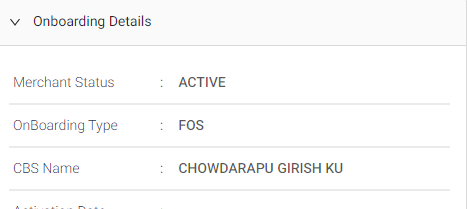
1.3 | Check if MID is Active | Email, Call, Portal | How to check: Check if the MID is active or not. Steps to check: -Enter the MID -Click on the Merchant Profile -Click on Onboarding details -Check Merchant Status- “Active” or not
| - | MHD L1 | |
1.3.1 | MID is not active Merchant Status: Any other Value | Email, Call, Portal | If the MID is not active, proceed - refer to 2.0 | - | MHD L1 | - |
1.3.2 | MID is active Merchant Status: ACTIVE | Email, Call, Portal | Inform mx that you have already been onboarded with us. Hi {Merchant_name}, Thank you for reaching out to us. I see that your PhonePe Business account is now active, you can start accepting payments from your customers. Ticket status: Resolved | G-Onboarding T-Post-lead I-Onboarding Status S-Active Ticket Status - Resolved | MHD L1 | IR |
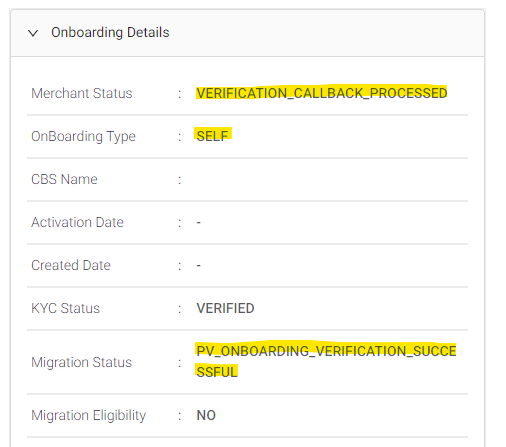
2.0 | Check mx onboarding stage and help merchant with the next steps to complete onboarding | Email, Call, Portal | Agent action: Check the onboarding Status on SCP Steps to check: -Login to merchant Console -Enter the MID -Click on the Merchant Profile -Click on Onboarding details - Check the below fields: Onboarding Type Merchant Status Migration Status
| - | MHD L1 | - |
2.11 | If Merchant Status = “ONBOARDING_INITIATED” or “CREATED” And Migration Status=Pending | Email, Call, Portal | Agent Action: Refer to the below mentioned Steps and Guide the Merchant to complete the KYC Journey - Communication: Hello, Thank you for contacting PhonePe Business. We understand that you wish to create a PhonePe Business account. Please follow the below mentioned steps in the PBApp, so that the Agent Visit can be scheduled to complete your Onboarding : Step 1 - Business details - In your PBApp account, please select the Category & Sub Category basis your Business Type (For Ex - If you have a General/KIrana Store, please select “Grocery and Daily Needs” > “Kirana & General Stores”) Step 2 - Enter the Business Name Step 3 - Store location details Step 4 - Bank account details Step 5 - KYC Documents such as PAN / Aadhar / GST / Driving License, Voter ID - make sure that the name on your bank account matches the name on your KYC document for a successful registration Once your KYC details are successfully submitted, one of our agents will visit your store to help you proceed. Please feel free to reach out to us for any concerns. Regards, PhonePe Merchant Helpdesk | Group:Onboarding Type:Post-lead Issue: Onboarding Status Sub Issue: Business_details Ticket Status - Pending Resolution Due by Time - T + 1 Day | MHD L1 | IR |
2.1.1 | If the merchant is facing issue sharing their business details | Email, Call, Portal | Refer to Process to handle concerns related Business Details | - | MHD L1 | - |
2.2 | If Merchant Status= BRANDING_ADDED And Migration Status= PENDING Or If Merchant Status= VERIFICATION_INITIATED And Migration Status= PV_ONBOARDING_VERIFICATION_INITIATED | Email, Call, Portal | Note: Merchant is stuck in Bank & KYC stage Agent Action: The Agent should check if they are stuck in Bank section or KYC Steps to check: -Login to SCP -Enter the MID -Click on the “Merchant Profile” -Check under “Onboarding stage details” -Check the latest “Stage”: -Check the “Step exists or not” (the agent should go to Onboarding stage details and scroll down and start from the bottom and move upwards and check if any recent Step exist or not ) | - | MHD L1 | – |
2.2.1 | if Step: BANK_SECTION | Email, Call, Portal | Note: Mx is yet to submit their bank details Agent Action: Check if any error code exists or not How to check: -Login to SCP -Enter the MID -Click on the Merchant Profile -Onboarding stage details - Check under step: BANK_SECTION - Check if field “Failed Error Code” exist: | - | MHDL1 | - |
2.2.1(a) | If error code exists - Bank verification failed | Email, Call, Portal | -Share the response as per the error code and update the sub issue as defined | As per error code | MHDL1 | - |
2.2.1(b) | If error code doesn’t exists | Email, Call, Portal | Agent Action: If there is no failure error code found in the SCP, the agent should inform the merchant to complete their onboarding journey by entering their bank details Check the FAQ to handle any queries mx might have Communication: Hi {Merchant_name}, Thank you for reaching out to us. We see that you haven’t submitted your details yet. We would request you to enter your Bank and KYC Documents such as PAN / Aadhar / GST / Driving License / Voter ID in the PBApp. Please make sure that the name on your bank account matches the name on your KYC document for a successful registration Once your KYC details are successfully submitted, one of our agents will visit your store to help you proceed. Please feel free to reach out to us for any concerns. Regards, PhonePe Merchant Helpdesk | Group-Onboarding Type-Post-lead Issue-Onboarding Status Sub-Issue- Bankkyc_pending Ticket Status - Pending Resolution Due By Time - T + 1 Day | MHDL1 | - |
2.2.1(c) | If merchants have concerns related to submitting the BANK account | For issues related to bank please refer to the L1 Process to handle concerns related to bank | - | MHDL1- | ||
2.2.2 | -If Step: PAN_SECTION/GST_SECTION/DL_VOTER_AADHAAR_SECTION | Email, Call, Portal | Check if error code exists or not | - | MHDL1 | - |
2.2.2(a) | If error code exists | Email, Call, Portal | -Status: ABORTED -Check Failure error code -Share the response as per the KYC error code and update the sub issue as defined | As per error code | MHDL1 | - |
2.2.2(b) | If the failure error code doesn’t exists | Email, Call, Portal | Agent Action: If there is no failure error code found in the SCP, the agent should inform the merchant to complete their onboarding journey. Communication: Hi {Merchant_name}, Thank you for reaching out to us. We see that you haven’t submitted your details yet. We would request you to enter your Bank and KYC Documents such as PAN / Aadhar / GST / Driving License / Voter ID in the PBApp. Please make sure that the name on your bank account matches the name on your KYC document for a successful registration Once your KYC details are successfully submitted, one of our agents will visit your store to help you proceed. Please feel free to reach out to us for any concerns. Regards, PhonePe Merchant Helpdesk | Group-Onboarding Type-Post-lead Issue-Onboarding Status Sub-Issue- Bankkyc_pending Ticket Status - Pending Resolution Due By Time - T + 1 Day | MHDL1 | - |
2.2.2(c) | Mx confirms Auto abort is not working | Email/Call/Portal | Escalate it to Service management TEAM. Hi, {Merchant name}. Thanks for sharing the screenshot of the error. Please be rest assured, we will get this checked with our team and update you by T+4 DAYS. We appreciate your patience in this regard. Please feel free to reach out to us for further assistance. Regards, PhonePe Merchant Helpdesk | Group-Onboarding Type-Post-Lead Issue- Onboarding Status Sub issue-Auto_abort_failure Status-Assign to L2 L2 Team: Service Management Team | Service Management | T+4 days |
2.2.3 | If Bank_Section or PAN_SECTION/GST_SECTION/DL_VOTER_AADHAAR_SECTION not visible in SCP | Email/Call/Portal | -If Bank_Section or PAN_SECTION/GST_SECTION/DL_VOTER_AADHAAR_SECTION is not visible in SCP then go to your Google Chrome setting clear browsing history and clear cache. -If the issue still persists, please ask the merchant to complete their bank and kyc details and share the below response: Hi {Merchant_name}, Thank you for reaching out to us. We see that you haven’t submitted your details yet. We would request you to enter your Bank and KYC Documents such as PAN / Aadhar / GST / Driving License / Voter ID in the PBApp. Please make sure that the name on your bank account matches the name on your KYC document for a successful registration Once your KYC details are successfully submitted, one of our agents will visit your store to help you proceed. Please feel free to reach out to us for any concerns. Regards, PhonePe Merchant Helpdesk | <Tagging if issue persist> Group-Onboarding Type-Post-lead Issue-Onboarding Status Sub-Issue- Bankkyc_pending Ticket Status - Pending Resolution Due By Time - T + 1 Day | MHDL1 | - |
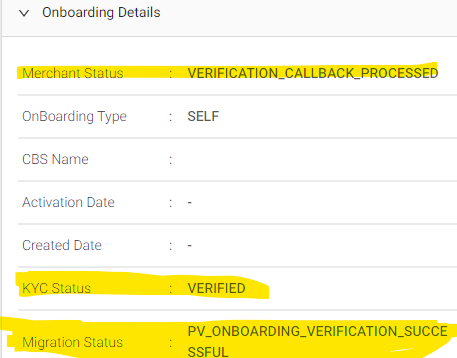
2.3 | If Merchant Status= VERIFICATION_CALLBACK_RECEIVED Migration Status= PV_ONBOARDING_VERIFICATION_IN_PROGRESS or Merchant Status= VERIFICATION_CALLBACK_PROCESSED and Migration Status= PV_ONBOARDING_VERIFICATION_IN_PROGRESS | Email, Call, Porta | Agent Action: Inform Merchant to wait for 24 hours as verification is taking time, once verification is done agent will visit your store for further verification Communication: Hi {Merchant_name}, Thank you for reaching out to us. We see that your onboarding is not yet completed. We would request you to wait for 24 hours as verification of the details shared is taking some time. Once verification is completed our representative will visit your store. Regards, PhonePe Merchant Helpdesk | Group-Onboarding Type-Post-lead Issue-Onboarding Status Sub-Issue- Bankkyc_pending | MHD L1 | – |
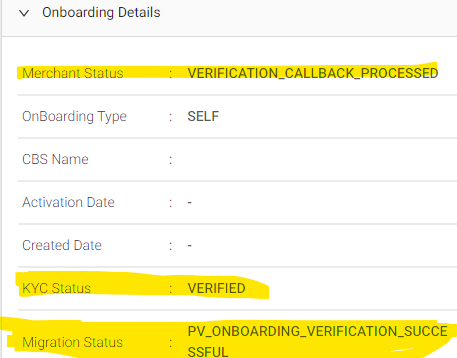
2.3 | If Merchant Status= VERIFICATION_CALLBACK_PROCESSED and Migration Status=PV_ONBOARDING_VERIFICATION_SUCCESSFUL Onboarding Stage is= Agent Visit Scheduled | Email, Call, Portal | Mx is pending for agent visit verification, please refer the L1 Process for Pending Agent visit concerns
| As per scenario | MHD L1 | - |
2.4 | If Merchant Status= BRANDING_ADDED And Migration Status= “Failed” or “PV_ONBOARDING_VERIFICATION_FAILED”
| Email, Call, Portal | Agent Action: Onboarding has failed and ask to retry Communication: " Hi {Merchant_name}, Thank you for reaching out to us. We are sorry to see that your account verification has failed. Usually, this happens if your bank account and KYC details don't match. We would request you to re-enter your Bank and KYC Documents such as PAN / Aadhar / GST / Driving License / Voter ID in the PBApp. Please make sure that the name on your bank account matches the name on your KYC document for a successful registration Once your KYC details are successfully submitted, one of our agents will visit your store to help you proceed. Please feel free to reach out to us for any concerns. Regards, PhonePe Merchant Helpdesk | Group-Onboarding Type-Post-lead Issue-Onboarding Status Sub-Issue- Failed Ticket Status - Pending Resolution Due By Time - T + 1 Day | MHD L1 | - |
2.4.1 | If mx confirm he unable to complete after multiple retry | Email, Call, Portal | Agent Action: The agent should escalate the ticket to Service Management : Communication: Hi, {Merchant name}. Thanks for reaching out to us. We would like to apologize for the inconvenience caused. Don't worry, we are escalating the issue to the concerned team and provide you with an update by T+4 days Please feel free to reach out to us for further assistance. Regards, PhonePe Merchant Helpdesk | Group-Onboarding Type-Post-lead Issue-Onboarding Status Sub-Issue-Failed Status-Assign to L2 L2 TEAM: Service Management Team | MHDL1 | T+4 days |
2.5 | If Merchant Status = MAPPED Or Merchant Status = QR_DOC_ADDED Or Merchant Status = READY_TO_SUBMIT And Migration Status = PV_ONBOARDING_VERIFICATION_IN_PROGRESS Or PV_ONBOARDING_VERIFICATION_SUCCESSFUL | Email, Call, Portal | Agent Action: Inform the merchant that we have received your request and once your verification is completed the account will be activated in 24 hours. Communication: " Hi {Merchant_name}, Thank you for reaching out to us. We see that the Agent has visited your store, Once your account verification is completed your account will be activated within 24 hours. Hence requesting you to wait until then. Regards, PhonePe Merchant Helpdesk | Group-Onboarding Type-Post-lead Issue-Onboarding Status Sub-Issue- Post_Visit Status-Resolved | MHDL1 | - |
2.5.1 | If mx confirm that he has been waiting for more than 24 hours post agent visit | Email, Call, Portal | Action: If the issue persists even after 24 hours. The agent should capture the below details and escalate it to Service Management Team -Onboarding Stage: -Updated at: -L2 TEAM: Service Management Communication: Hi, {Merchant name}. Thanks for reaching out to us. We would like to apologize for the inconvenience caused. Don't worry, we are escalating the issue to the concerned team and provide you with an update by T+4 days Please feel free to reach out to us for further assistance. Regards, PhonePe Merchant Helpdesk | Group-Onboarding Type-Post-lead Issue-Onboarding Status Sub-Issue- Post_Visit Status-Assign to L2 L2 Team: Service Management Team | MHDL1 | - |
3 .L1 Process for handling concerns related to Business details |
# | Process | Source | Action | GTIS | Owner | TAT |
1.0 | Business category is not listed or unable to understand the business category | Email, call, Portal | - Ask for line of business - Refer to the List and help merchant with the category Capture the below mentioned details- -Merchant Type -GTIS Communication: Hi, {Merchant name}. Thanks for reaching out to us. As mentioned on call, please use <Business Category> to proceed ahead with creating your merchant account. For Ex - If you have a General/KIrana Store, please select “Grocery and Daily Needs” > “Kirana & General Stores” Please feel free to reach out to us for further assistance. Regards, PhonePe Merchant Helpdesk | New GTIS: Group-Onboarding Type-Post-lead Issue- Onboarding Status Sub issue- Category Issue - Info given Ticket Status - Pending Resolution Due By Time - T + 1 Day | MHDL1 | DR |
2.0 | Unable to select the category | Email/call/Portal | Action: Ask the merchant to clear the cache, relaunch the app and try again Capture the below mentioned details- -Merchant Type -Waiting On Merchant -GTIS Communication: Hi, {Merchant name}. We would request you to please follow the below mentioned troubleshooting steps and retry again: >Go to app settings >clear cache> >Relaunch the app and try again If in case the issue persists, please share with us the error screen recording that you’re getting while trying to select the category, so we can get this checked for you and assist you accordingly. Awaiting your response. Please feel free to reach out to us for further assistance. Regards, PhonePe Merchant Helpdesk | Group-Onboarding Type-Post-lead Issue- Onboarding Status Sub issue- Category Issue - Asked details Ticket Status - Waiting on Merchant | MHDL1 | IR |
2.1 | If the merchant reverts with the screen shot | Email/call/Portal | Once the merchant reverts with the screen shot. Inform the merchant that we will escalate the issue to our concerned team and share a TAT of T+4 days. Capture the below mentioned details- -Merchant Type -Merchant name -Mobile number -Assign to L2 - Updated at Hi, {Merchant name}. Thanks for sharing the screenshot of the error. Please be rest assured, we will get this checked with our team and update you by T+4 DAYS. We appreciate your patience in this regard. Please feel free to reach out to us for further assistance. Regards, PhonePe Merchant Helpdesk | G-Onboarding T-Post-lead I-Onboarding Status S- Category Issue-escalation Status-Assign to L2 L2 Team:Service Management Team | MHDL1 | T+ 4 days DR |
3.0 | Unable to share store location or Pincode not available | Email/call/Portal | Checks: - Check if merchant GPS is turned on - App is updated to latest version - PB app has the location permission -Go to APP>setting>Location>allow access Action: Post the checks are done ask merchant to relaunch the app and try again and confirm their Pincode and capture in the private note Communication: Hi, {Merchant name}. Thanks for reaching out to us. Please ensure that you have a strong internet connection and that your GPS is turned on. Then, relaunch the app and try again. Also, ensure that you have given location access permission to the app to determine your location by following the below mentioned steps:
If you're unable to auto fetch, or Pincode shows unavailable we would request you to enter the details manually. If the issue still persists you may share a screen recording of the error, so we can get this checked and assist you accordingly. Please feel free to reach out to us for further assistance. Regards, PhonePe Merchant Helpdesk | G-Onboarding T-Post-lead I-Onboarding Status S- Location Issue - Info given Ticket Status - Pending Resolution Due By Time - T + 1 Day | MHDL1 | |
3.1 | Unable to share store location - Merchant shares screen recording | Email,call | Inform the merchant that we will escalate the issue to our concerned team and share a TAT of T+4 days. Capture the below mentioned details- Hi, {Merchant name}. Thanks for sharing the screenshot of the error. Please be rest assured, we will get this checked with our team and update you by T+4 DAYS. We appreciate your patience in this regard. Please feel free to reach out to us for further assistance. Regards, PhonePe Merchant Helpdesk | G-Onboarding T-Post-lead I-Onboarding Status S- Location Issue - escalation Ticket Status-Assign to L2 L2 Team: Service Management Capture the fields: -Merchant Type - VOM: - Onboarding Status
| MHDL1 | T+4 days DR |
4. L1 Process for handling concerns to Bank |
# | Process | Source | Action | GTIS | Owner | TAT |
1. | If wrong bank account details fetched while On-boarding or no bank account is shown | Email/call/Portal | Actions: -Incase if bank account is not auto fetched mx can share the bank details manually by clicking “Add Bank Account Manually” Communication: Hi, {Merchant name}. Thanks for reaching out to us. We understand your concern about the wrong bank account being fetched. We would like to inform you that the bank account linked to your registered mobile would be visible on the app. If you wish to share another bank account, we would request you to enter your bank details manually. Please feel free to reach out to us for further assistance. Regards, PhonePe Merchant Helpdesk | Group:Onboarding Type: Post-lead Issue: Onboarding Status Sub Issue: Bank fetch - Info given Ticket Status - Pending Resolution Due By Time - T + 1 Day Capture the below mentioned details- -Merchant Type -Pincode -GTIS | MHDL1 | IR |
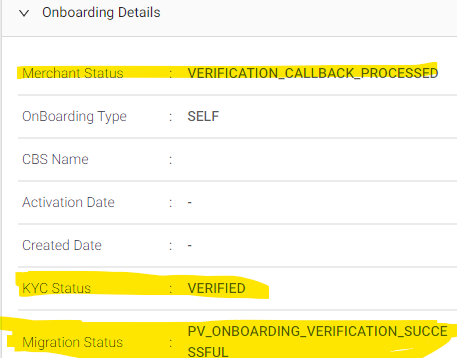
2.0 | If merchant want to change bank account | Email/call/Portal | -Check if KYC is verified or not -Steps to check: -Login to merchant Console -Enter the MID -Click on the Merchant Profile -Click on Onboarding details
| - | - | - |
2.1 | If the KYC status = verified | Email/call/Portal | Agent action: Merchant KYC is successfully submitted as per stage mapping in SCP. inform merchant once there account get activated then can’t change their bank account Communication: Hi, {Merchant name}. Thanks for reaching out to us. We understand that you want to change your bank account. We see that you have successfully submitted your KYC details. Once your account gets activated, you can change your bank account with a different one. Please feel free to reach out to us for further assistance. Regards, PhonePe Merchant Helpdesk | Group:Onboarding Type:Post-lead Issue: Onboarding Status Sub Issue: Change Bank account- Info Given Ticket Status: Resolved | MHDL1 | IR |
2.2 | If KYC status is not verified | Email/call/Portal | Agent action: Merchant KYC is not verified, then ask the merchant to wait for 24 hours and retry again. Communication: Hi, {Merchant name}. Thanks for reaching out to us. We understand that you want to change your bank account. We would request you to wait for 24 hours and try linking a different bank account. Please feel free to reach out to us for further assistance. Regards, PhonePe Merchant Helpdesk | Group:Onboarding Type:Post-lead Issue: Onboarding Status Sub Issue: Change Bank account- Info Given Ticket Status - Pending Resolution Due By Time - T + 1 Day |
5. L1 Process for handling concerns to Agent visit |
# | Process | Source | Action | GTIS | Owner | TAT |
1. | If Merchant is waiting for Agent visit pending | Email, call, Portal | Should check the Onboarding status in SCP.
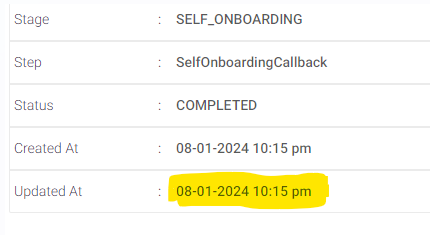
-Click on Onboarding Details -Check the latest “Updated at” fields and capture -How to check the update at date: Check the onboarding Status on SCP Steps to check: -Login to merchant Console -Enter the MID -Click on the Merchant Profile -Click on Onboarding stage details -Scroll down and Check last “Updated at” date and update in the FD properties Created date and capture the date
| - | - | |
1.1 | If difference between Today’s Date & Updated at date is Less than 7 days (0-6 days) | Email, call, Portal | Inform that the agent visit will take place within a week and Capture the below fields in properties:
Communication: Hi <Merchant Name> I see that you've shared everything needed to create your PhonePe Business account. Don't worry, one of our agents will try to visit your store within a week to help you complete your verification. Please feel free to reach out to us for further assistance. Regards, PhonePe Merchant Helpdesk Capture the below field in the properties
| Group-Onboarding Type-Post-Lead Issue- Onboarding Status Sub issue-Pending_Visit Status- Assign to L2 L2 Team - ServiceManagement ETA - T + 7 Days | - | IR |
1.2 | If difference between Today’s Date & Updated at date is 7-14 days | Email, call, Portal | Inform that we will get agent visit done in a weeks time and capture the below fields in the properties:
Communication: Hi <Merchant Name> I understand you have completed documents submission and are waiting for an Agent to visit your store for verification. I've already checked this with the concerned team and our agent will visit your store within a week to complete your verification. Request your patience till then I’m sorry for the inconvenience this has caused. Please feel free to reach out to us for further assistance. Regards, PhonePe Merchant Helpdesk Capture the below field in the properties
| Group-Onboarding Type-Post-Lead Issue- Onboarding Status Sub issue- Delayed_Visit Status- Assign to L2 L2 Team - ServiceManagement ETA - T + 7 Days | MHDL1 | IR |
1.3 | If difference between Today’s Date & Updated at date = > = 15 days. (first time contact) | Email, call, Portal | Agent action: Inform that we will get agent visit done in a 3 days
Communication: Hi <merchant Name> We're sorry for the delay! ... Don't worry, we'll look into this on priority and make sure one of our agents visits your store within 3 days. ... We will share an update with you soon. Capture the below field in the properties
| Group-Onboarding Type-Post-Lead Issue- Onboarding Status Sub issue- Delayed_Visit>15 Days Status- Assign to L2 L2 Team: Service Management ETA - T + 3 Days | MHDL1 L2 TEAM: SERVICE MANAGEMENT | DR |
1.4 | If difference between Today’s Date & Updated at date => 15 days (Where L2 has already given the response) | Agent action:
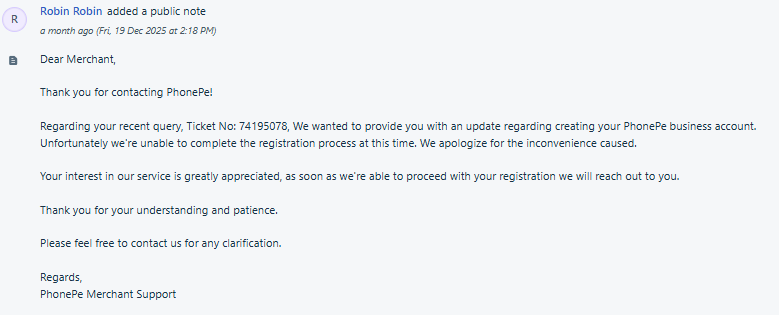
Communication: Hi <merchant Name>, Greetings from PhonePe! We understand that your PhonePe Business account is not yet activated. Unfortunately, we're unable to complete the registration process at this time due to a high volume of verification requests resulting in a delay in the agent's visit to your store. We apologize for the inconvenience caused. Your interest in our service is greatly appreciated. We are currently resolving this ticket, rest assured as soon as we're able to proceed with your registration we will reach out to you Thank you for your understanding and patience! Regards, Phonepe Merchant HelpDesk | Group-Onboarding Type-Post-Lead Issue- Onboarding Status Sub issue- Delayed TAT Breached. Status- Resolved | MHDL1 L2 TEAM: SERVICE MANAGEMENT | DR |
6. L2 process for MHD L2 Team-MHDL2 Manual |
# | Process | Source | Action | GTIS | Ownership | TAT |
1. | Issues related to KYC OTHERS gets escalated | Email, Call, Portal | The agent should login to SCP Steps tp check: -Login to merchant Console -Enter the MID -Click on the Merchant Profile -Click on Onboarding details - Step - PAN_SECTION/GST_SECTION/DL_VOTER_AADHAAR_SECTION -KYC Verified or Failed or nothing is visible
| - | MHDL2 | - |
1.1 | If KYC is verified but account not active | Email, Call, Portal | Agent action: The agent should inform the merchant that KYC is verified and resolved the ticket Hi {Merchant_name}, Thank you for reaching out to us. We see that your KYC is verified and our agent will visit your store within (check the aging and inform TAT). Hence requesting you to wait until then. Regards, PhonePe Merchant Helpdesk | As per VOM | MHDL2 | - |
1.2 | If KYC is Failed | Email, Call, Portal | Agent action: The agent should check if the failure reason is visible in the SCP -Go to SCP -Enter the MID -Click on the Merchant Profile -Click on Onboarding stage details -Check the time stamps and see if failure code available | - | MHDL2 | - |
1.2.1 | If KYC is Failed and failure error code available | Email, Call, Portal | Agent action: Check the error code and share the communication | As per the error code | MHDL2 | - |
1.2.2 | If KYC is Failed and failure reason not available | Email, Call, Portal | Agent Action: If no details are visible in the SCP and agents are unable to identify the reason of failure, the agent should escalate to MSR_L3 team. Communication: Hi, {Merchant name}. Thanks for reaching out to us. We would like to apologize for the inconvenience caused. Don't worry, we are escalating the issue to the concerned team and provide you with an update by T+4 days Please feel free to reach out to us for further assistance. Regards, PhonePe Merchant Helpdesk | Group-Onboarding Type-Post-lead Issue-Onboarding Status Sub-Issue- Failed Status-Assign to L2 L2 team: MSR_L3 Onboarding Stage Updated at | MHDL2 | T+4 days |
2. | Issues related to Bank section gets escalated | Email, Call, Portal | The agent should login to SCP Steps tp check: -Login to merchant Console -Enter the MID -Click on the Merchant Profile -Click on Onboarding details - Step - BANK_SECTION - Status - ABORT
| - | MHDL2 | - |
2.1 | If Bank verification is Failed and failure error code available | Email, Call, Portal | Agent action: Check the error code and share the communication | As per the error code | MHDL2 | - |
2.2 | If Bank verification is Failed and failure reason not available | Email, Call, Portal | Agent Action: If no details are visible in the SCP and agents are unable to identify the reason of failure, the agent should escalate to MSR_L3 team. Communication: Hi, {Merchant name}. Thanks for reaching out to us. 8 We would like to apologize for the inconvenience caused. Don't worry, we are escalating the issue to the concerned team and provide you with an update by T+4 days Please feel free to reach out to us for further assistance. Regards, PhonePe Merchant Helpdesk | Group-Onboarding Type-Post-lead Issue-Onboarding Status Sub-Issue- Failed Status-Assign to L2 L2 team: MSR_L3 Onboarding Stage Updated at | MHDL2 | T+4 days |
4 | Once the MSR team receives the ticket | Email, call, Portal | The Merchant services request Team should check the details and update resolution in private note and change the L2 team to MHDL2. | GTIS - As per scenario | Merchant services Request Team | T+4 days |
5 | Once the tickets get assigned to the MHDL2 with the resolution | Email, call, PortaL | After receiving the resolution the MHDL2, should share the resolution accordingly and resolve the tickets | GTIS- As per scenario Status-Resolved | MHDL2 | - |
7. L2 Process for Service Management |
# | Process | Source | Action | GTIS | Owner | TAT | ||||||||||||||||||
1. | If the merchant is unable to select business category Sub Issue - Category Issue-escalation Ticket | Email, Call, Portal | Agent action: -Should collate the list on a daily basis with this GTIS and escalate it to MSR team Communication: Hi, {Merchant name}. Thanks for sharing the screenshot of the error. We will get this checked for you with our team and update you by T+4 DAYS. We appreciate your patience in this regard. Please feel free to reach out to us for further assistance. Regards, PhonePe Merchant Helpdesk | G-Onboarding T-Post-lead I-Onboarding Status S- Category Issue-escalation Ticket Status-Assign to L2 L2 Team:MSR_L3 Onboarding Stage: Business details Updated at | Service Management | T+ 4 DAYS | ||||||||||||||||||
2 | If merchant is unable to select store location or Pin Code unavailable Sub Issue: Location Issue - escalation | Email, Call, Portal | Agent action: -Should collate the list on a daily basis with this GTIS and escalate it to MSR team Communication: Hi, {Merchant name}. Thanks for sharing the screenshot of the error. We will get this checked for you with our team and update you by T+4 DAYS. We appreciate your patience in this regard. Please feel free to reach out to us for further assistance. Regards, PhonePe Merchant Helpdesk | G-Onboarding T-Post-lead I-Onboarding Status S- Location Issue - escalation Status: Assigned to L2 L2 team: MSR_L3 Onboarding Stage: Business details Updated at | Service Management | T+ 4 DAYS | ||||||||||||||||||
3 | If Auto abort is not working even after 24 hours Sub Issue: Auto_abort_failure | Email, Call, Portal | Agent action: -Should collate the list on a daily basis with this GTIS and escalate it to MSR team Communication: Hi, {Merchant name}. Thanks for sharing the screenshot of the error. We will get this checked for you with our team and update you by T+4 DAYS. We appreciate your patience in this regard. Please feel free to reach out to us for further assistance. Regards, PhonePe Merchant Helpdesk | Group-Onboarding Type-Post-lead Issue-Onboarding Status Sub-Issue-Auto_abort_failure Status-Assign to L2 L2 TEAM: MSR_L3 Onboarding Stage: Bank & KYC Updated at | Service Management | T+ 4DAYS | ||||||||||||||||||
4 | KYC already in use scenarios confirmed that documents have never been used by them | Communication: Hi, {Merchant name}. Thanks for reaching out to us. We understand that you’re getting an error while trying to link your KYC document. We are escalating the issue to the concern team and provide you with an update by T+4 DAYS. Please feel free to reach out to us for further assistance. Regards, PhonePe Merchant Helpdesk | Group-Onboarding Type-Post-lead Issue-Onboarding Status Sub-Issue-As per VOM Status-Assign to L2 L2 TEAM: MSR_L3 Onboarding Stage: Bank & KYC Updated at | Service Management | T+ 4 days | |||||||||||||||||||
5 | Tickets where Sub Issue: Pending_Visit / Delayed_Visit / Delayed_Visit>15 Days Status: Assign to L2 L2 Team: Service Management | Email, Call, Portal | Follow the below process:
| - | Service Management | - | ||||||||||||||||||
5.1 | If the Task - Available | Email, Call, Portal | Check if the account is active | Service Management | - | |||||||||||||||||||
5.1.1 | If the Task - Available MX is active | Email, Call, Portal | Inform mx that you have already been onboarded with us. Hi {Merchant_name}, Thank you for reaching out to us. I see that your PhonePe Business account is now active, you can start accepting payments from your customers. Ticket status: Resolved | Ticket Status - Resolved | Service Management | - | ||||||||||||||||||
5.1.2 | If the Task - Available Mx is not Active Ticket SubIssue: Pending_Visit Delayed_Visit | Check the ETA from the TIcket Creation Date and map the ETAs accordingly in the response that will be sent to Mx | - | Service Management | - | |||||||||||||||||||
5.1.2 (a) | If the Task - Available Mx is not Active Ticket SubIssue: Pending_Visit Delayed_Visit ART - <15 Days from the time of Ticket Creation —--------- Ticket SubIssue: Delayed_Visit>15 Days ART - <3 Days from the time of Ticket Creation | Email, Call, Portal | Send the below communication to Merchant and keep the ticket status as Pending. Communication: “ Hi <Merchant Name>, Greetings from PhonePe! We understand that your PhonePe Business account is not yet activated and we apologize for the inconvenience caused. Please be assured, we are working closely with the Agent on this and it should happen anytime before <DATE>. Your interest in our service is greatly appreciated. Thank you for your understanding and patience! Regards, Phonepe Merchant HelpDesk “ | - | Service Management | - | ||||||||||||||||||
5.1.2 (b) | If the Task - Available Mx is not Active Ticket SubIssue: Pending_Visit Delayed_Visit ART - >15 Days from the time of Ticket Creation —--------- Ticket SubIssue: Delayed_Visit>15 Days ART - >3 Days from the time of Ticket Creation | Email, Call, Portal | Send the below communication to Merchant and keep the ticket status as Resolved. Communication: “ Hi <merchant Name>, Greetings from PhonePe! We understand that your PhonePe Business account is not yet activated. Unfortunately, we're unable to complete the registration process at this time due to a high volume of verification requests resulting in a delay in the agent's visit to your store. We apologize for the inconvenience caused. Your interest in our service is greatly appreciated. We are currently resolving this ticket, rest assured as soon as we're able to proceed with your registration we will reach out to you Thank you for your understanding and patience! Regards, Phonepe Merchant HelpDesk “ | Ticket Status - Resolved | Service Management | - | ||||||||||||||||||
5.2 | If the MX is not active and Task not created not found in GTM sheet |
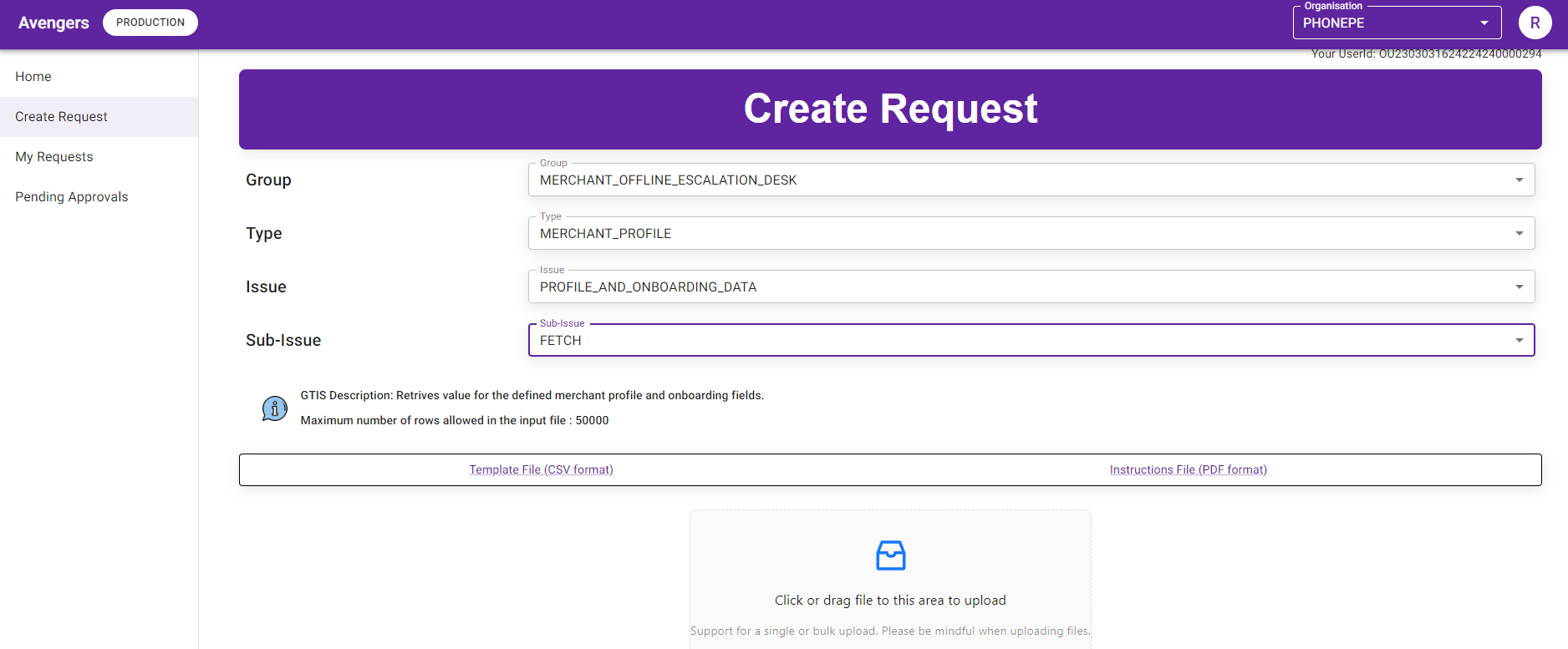
Steps to check: STEP1: -Login to Avengers -Go to create Request -Enter the below details in GTIS column:
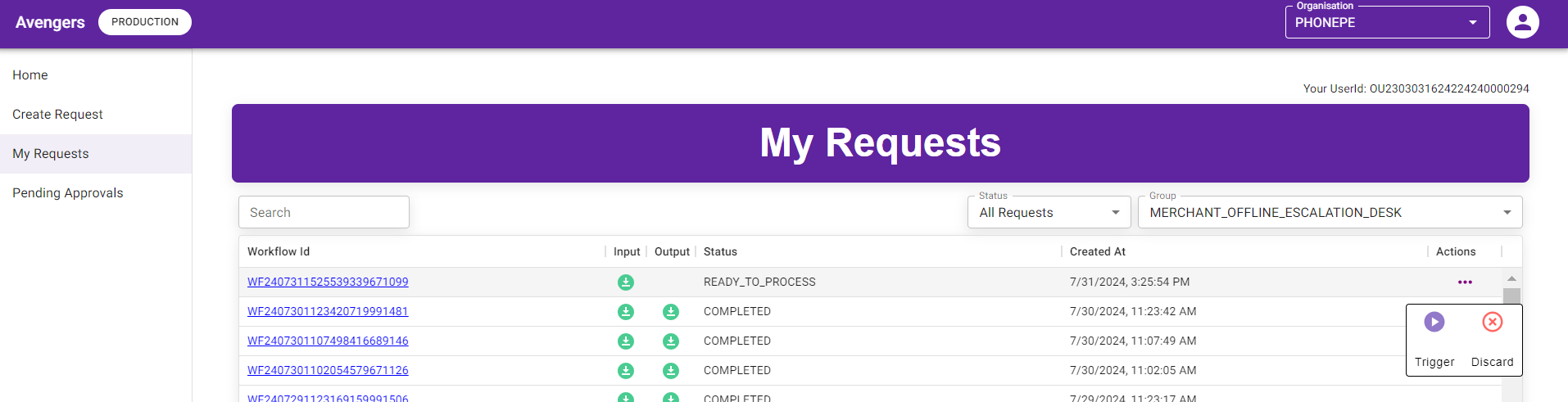
-Group- MERCHANT_OFFLINE_ESCALATION_DESK -Type- MERCHANT_PROFILE -Issue - PROFILE_AND_ONBOARDING_DATA -Sub Issue - FETCH -Click and upload the MID list file STEP 2: Click on My request and check the status should be APPROVAL_PENDING The SM person should ask the Approver to Approve the request
STEP 3: Once the Approver, approves the request, the status will change to READY_TO_PROCESS and the SM team should click on right end corner trigger option to generate the Output file
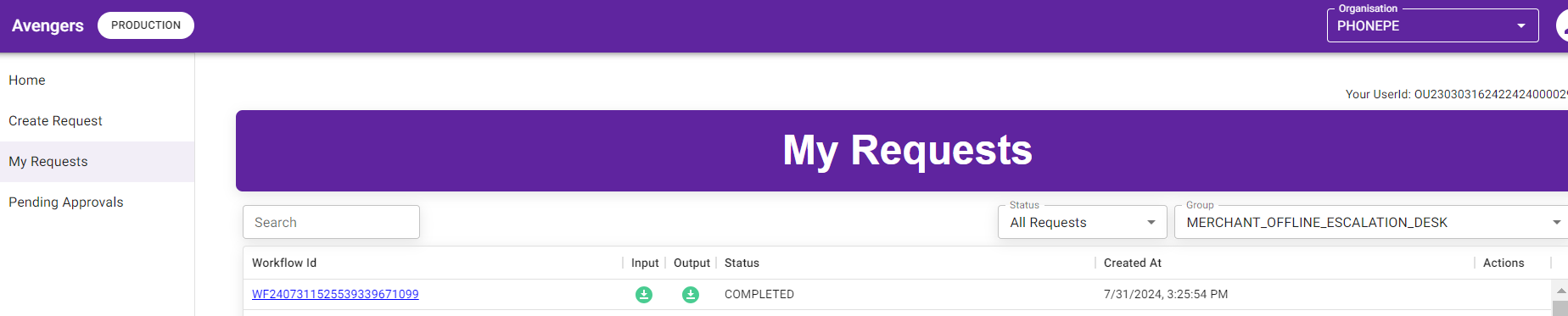
STEP 4:The SM team should wait for the Status to get changed to COMPLETED, post which they can click on the download option under the Output file column.
Once the data is generate the SM team should check for the Acquisition type is Self and Store ID mapped under those MIDS and share it across with the GTM team on a an interval of 15 days for which task has not been created and follow up until the task get created and escalate those MIDS accordingly. Follow - 5.1.2 hereafter | - | Service Management | - | |||||||||||||||||||
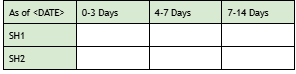
All the Pending Tasks should be highlighted to GTM teams | Step 1 - Map the SectorHead against each task referring to SectorHeadSheet - Urban SectorHeadSheet - Rural Step 2 - Once mapped, Pivot the Pending Tasks with Ageing & SH Mapped Step 3 - Send an email to GTM teams in the below mentioned format - To - SectorHeads, Manish Kumar Rahul Yadav... CC - Riti Singh Saadhvi Bhukya Amar Narayana Chari K... Hi Team, Please find below the Pending Agent Visits list, where these Merchants have approached MHD-Helpdesk complaining that the Visit is delayed. Pending Tasks with Ageing & SH Mapped
The highest number of merchants with delayed visit requests in the 7-14 days are as follows:
@SH1 @SH2…etc - Please ensure the Visits for these Merchants are prioritised, else, confirm if not serviceable so that same can be communicated to Mxs. Manish Kumar Rahul Yadav- Please intervene and get this actioned at the earliest. Regards, MHD - ServiceManagement Team P.S. This activity must be executed every alternate day | Service management | ||||||||||||||||||||||
Any ticket Reopen >3 After we have shared the Bulk solve stating “Unfortunately, we're unable to complete the registration process at this time due to a high volume of verification requests” | Address the sub-issue "Delayed_Visit > 15 Days," where we are seeing more than three reopens even after performing a bulk solve. Step 1 - Map the SectorHead against each task referring to SectorHeadSheet - Urban SectorHeadSheet - Rural Step 2 - Once mapped, Pivot the Pending Tasks with Ageing & SH Mapped Step 3 - Send an email to GTM teams in the below mentioned format - To - SectorHeads, Manish Kumar Rahul Yadav Ravi Katiyar … CC - Riti Singh Saadhvi Bhukya Amar Narayana Chari K... Hi Team, Please find below the MID, where these Merchants have approached MHD-Helpdesk and reopened the case more than 3 times, asking for the agent's visit. After they have been informed that it is not serviceable. Pending Tasks with Ageing & SH Mapped:
Number of ticket reopened> 3 and visit delay by >15 days
@SH1 @SH2…etc - Please ensure the Visits for these Merchants are prioritised, as Merchant want Visit. Manish Kumar Rahul Yadav Ravi Katiyar - Please intervene and get this actioned at the earliest. Regards, MHD - ServiceManagement Team | Service management | ||||||||||||||||||||||
5.2 | If agent visit has not happened
| Email, Call, portal | Follow the below steps:
| Capture in all cases Onboarding Stage: Agent Visit Scheduled Updated at | Service Management | - | ||||||||||||||||||
5.1 | If the Sub issue: Pending Visit | Email, Call, portal | Check if the ticket aging crosses the due date (T+7 Days) | - | Service Management | |||||||||||||||||||
5.1.1 | If aging within 7 days | Email, Call, portal | Escalate to GTM GTM L2 escalation- zdh@phonepe.com -CC below mentioned contacts: -rural-regional-manager@phonepe.com, -akshat.chaturvedi@phonepe.com, -alister.dsouza@phonepe.com Hi, {Merchant Name}. We understand your concern that agent is yet to visit your store. Don't worry, we are looking into this on priority and will make sure the agent visit will happen in a weeks time. Requesting yout to wait until then. Please feel free to reach out to us for any concerns. Regards, PhonePe Helpdesk | Status-Resolved | Service Management | -IR | ||||||||||||||||||
5.1.2 | If aging crosses 7 days | Email, Call, portal | Agent Action: Communicate to merchant repromised TAT of 7 days and escalate to GTM Communicate: Hi, {Merchant Name}. Due to a high volume of verification requests, we are expecting a delay in the agent's visit to your store. Don't worry, we are looking into this on priority and will make sure the agent visit will happen in a weeks time. We'll give you an update here as soon as we have it. Regards, PhonePe Helpdesk | - | Service Management | T+7 | ||||||||||||||||||
5.1.3 | If the aging crosses 14 days | Email, Call, portal | Agent Action: Communicate to merchant repromised TAT of 3 days and escalate to GTM GTM L3 Escalation- -self-onboarding-lead@phonepe.com CC: -saurabh.taran@phonepe.com Communicate: Hi, {Merchant Name}. Due to a high volume of verification requests, we are expecting a delay in the agent's visit to your store. Don't worry, we are looking into this on priority and will make sure the agent visit will happen in a weeks time. We'll give you an update here as soon as we have it. Regards, PhonePe Helpdesk | - | Service Management | T+3 | ||||||||||||||||||
5.2 | If the Sub issue: Delayed Visit | Email, Call, Portal | Update GTIS if necessary Escalate to GTM GTM L2 escalation- zdh@phonepe.com -CC below mentioned contacts: -rural-regional-manager@phonepe.com, -akshat.chaturvedi@phonepe.com, -alister.dsouza@phonepe.com | - | Service Management | - | ||||||||||||||||||
5.2.1 | If aging within 7 days | Email, Call, portal | Escalate to GTM GTM L2 escalation- zdh@phonepe.com -CC below mentioned contacts: -rural-regional-manager@phonepe.com, -akshat.chaturvedi@phonepe.com, -alister.dsouza@phonepe.com Hi, {Merchant Name}. We understand your concern that agent is yet to visit your store. Don't worry, we are looking into this on priority and will make sure the agent visit will happen in a weeks time. Requesting yout to wait until then. Please feel free to reach out to us for any concerns. Regards, PhonePe Helpdesk | - | - | |||||||||||||||||||
5.2.2 | If aging crosses 7 days | Email, Call, portal | Agent Action: Communicate to merchant repromised TAT of 3 days and escalate to GTM GTM L3 Escalation- -self-onboarding-lead@phonepe.com CC: -saurabh.taran@phonepe.com Communicate: Hi, {Merchant Name}. Due to a high volume of verification requests, we are expecting a delay in the agent's visit to your store. Don't worry, we are looking into this on priority and will make sure the agent visit will happen in the next 3 days time. We'll give you an update here as soon as we have it. Regards, PhonePe Helpdesk | - | Service Management | T+3 | ||||||||||||||||||
5.2.1 | If the Sub issue: Pending_Visit / Delayed_Visit / Delayed_Visit> 15 Within the ETA shared | Email, Call | Collate the Tickets dump along with MIDs and send an email to all the stakeholders. (Refer to next step) | - | Service Management | - | ||||||||||||||||||
5.2.1(a) | If aging within 3 days | Email, Call, portal | GTM L3 Escalation- -self-onboarding-lead@phonepe.com CC: -saurabh.taran@phonepe.com | T+3 | ||||||||||||||||||||
5.2.1(b) | If aging crosses 3 days | Email, Call, portal | Escalate to GTM: GTM L4 Escalation- Communication: Hi, {Merchant Name}. Due to a high volume of verification requests, we are expecting a delay in the agent's visit to your store. Rest assured, we're looking into this on priority and will give you an update here as soon as we have it. Regards, PhonePe Helpdesk | |||||||||||||||||||||
5.2.1(c) | If aging crosses >15 days | Email, Call, portal | Service Management team to update the GTIS and share the below communication and resolve the tickets Communication: "Hi <Merchant Name>, We wanted to provide you with an update regarding creating your phonepe business account. Unfortunately we're unable to complete the registration process at this time. We apologize for the inconvenience caused. Your interest in our service is greatly appreciated, as soon as we're able to proceed with your registration we will reach out to you. Thank you for your understanding and patience" | Group- Onboarding Type- Post-lead Issue- Onboarding status Sub Issue- Delayed TAT Breached | - | - | ||||||||||||||||||
6 | If account is not activated even after 24 hours after Post Agent visit | Email, Call, Portal | Agent action: -Should collate the list on a daily basis with this GTIS and escalate it to MSR team Communication: Hi, {Merchant name}. Thanks for reaching out to us. We would like to apologize for the inconvenience caused. Don't worry, we are escalating the issue to the concerned team and provide you with an update by T+4 days Please feel free to reach out to us for further assistance. Regards, PhonePe Merchant Helpdesk | Group-Onboarding Type-Post-lead Issue-Onboarding Status Sub-Issue- Post_Visit Status-Assign to L2 L2 Team:MSR_L3 Onboarding Stage: Post Agent Visit Updated at | Service Management | T+4 DAYS | ||||||||||||||||||
7. | Once the tickets get escalated to MSR team | Email, Call, Portal | Once the tickets gets escalated to the MSR team, the MSR team should check the tickets and update the resolution in the private note and inform the same to the SM team. | AS PER VOM | MSR TEAM | T+4 DAYS | ||||||||||||||||||
8. | After getting an update from MSR team | Email, Call, Portal | Once the agents are able to get the resolution from the MSR team, the agent should collate all the resolution from the MSR Team, as per the scenarios and proceed with the bulk closure for the same. | AS PER VOM Status– Resolved | Service Management | - |


8. Reopen/Repeat |
If the merchant replies to unresolved tickets, they are considered repeats.
If the merchant replies to resolved/closed tickets, they are considered reopen.
# | Process | Source | Action | GTIS | Owner | TAT |
1 | Reopen Tickets | Email, Call, Portal | All reopened tickets will be assigned to the L2 team, where the team will follow the L1 and L2 process to address merchant issues and update the ticket status accordingly. | As per SOP | MHD L2 | - |
2. | Repeat Tickets - If ticket does not have Assigned to L2 tag | Email, Call, Portal | Repeat tickets will be assigned to L1 team, where the team will follow L1 process to address the issue and update the status accordingly | As per SOP | MHD L1 | |
3. | Repeat Tickets - If ticket have Assigned to L2 tag | Email, Call, Portal | These tickets will be assigned to the L2 team, where the team will follow the L2 process to address merchant issues and update the ticket status accordingly. | As per SOP | MHD L2 | - |
4. | Reopen Tickets - If ticket have Assigned to L2 service Management | Portal, | The pending visit tickets <7 days and >7 days if tickets get reopened the Service Management team should collate the <7 days ticket and proceed with bulk closure after sharing the response. | Sub Issue- Pending Visit And Sub Issue- Delayed_Visit | Service Management | - |
9. Social Media/Leadership Tagging |
# | Process | Source | Action | Communication | GTIS | Owner | TAT | IR/DR |
1.1 | If the merchant reaches out for Onboarding is stuck scenarios | Social Media | Follow the L1 and L2 process to address merchant issues and update the ticket status accordingly. | - | - | - | - | - |
1.2 | If it requires escalation | Social Media | The Social Media team should raise the concerns to the Grievance team by creating a ticket in FD. | - | Status-Open Tags: Escalation_Ticket Merchant_ED | - | T+2 working days | - |
1.2.1 | Actions to be taken by Grievance team | Social Media | The Grievance team should validate those cases, if it requires escalation then they should collate the tickets and update in their tracker and escalate it to SM team | - | GTIS as per the scenario Status-Assign to L2 L2 Team: Service Management | - | -T+2 working days | - |
1.2.2 | Actions to be taken by SM team | Social Media | The Grievance team will update the tracker, post which the Service Management team should collate the tickets and escalate to MSR Team | - | GTIS as per the scenario | - | T+2 days | - |
1.2.3 | Once the ticket get escalated to MSR team | Social Media | The MSR team should update the resolution in the private note and inform the same to the Service Management team | - | - | - | T+2 day | - |
1.2.4 | Getting update from MSR | Social Media | After getting the resolution the Service Management team should update the tracker for Social media team reference | - | – | - | T+2 day | - |
1.2.5 | After getting the resolution | Social Media | The grievance team should share the resolution with the Social Media team and resolve the tickets, post which the Social media team will share the resolution in the social media platform, as the case may be. | - | GTIS as per the scenario Status-Resolved | - | T+2 day | - |
1.2.6 | For Agent visit scenarios | Social Media | The Social media team should escalate the ticket and inform the SM team | - | GTIS as per the scenario Status-As per the scenarios Tags- Escalation_Ticket Merchant_ED | - | As per the scenarios defined in SOP | - |
1.2.7 | Actions by the SM team | Social Media | The Service management team should escalate the same as defined in the SOP, however based on the social media tag for delayed visit they can highlight in the email , so it can be taken up on priority. | - | - | T+2 days | - | - |
Note: ED is Deprecated
10. ED PROCESS IF AGENTS REACHES OUT FOR ONBOARDING CONCERNS ON MHD - |
# | Process | Action | Communication | GTIS | Owner | TAT | IR/DR |
1. | If FOS Agents reaches out on MHD HELP DESK | Inform the FOS to reach out to ACE HELP DESK | Communication: Hi, Thanks for contacting PhonePe Merchant Helpdesk. For any concerns related to merchant onboarding on ace, we would request you to kindly reach out to us on aceonboarding-support@phonepe.com. Please feel free to contact us if you have any further questions. Regards, PhonePe Merchant Helpdesk | Group:Onboarding Type:Post-lead Issue:Onboarding status Sub Issue: Redirect to ACE support | ED TEAM | - | IR |
11. BANK ERROR CODES |
Error code | Communication | Sub issue | Status |
DEPENDENT_ACTION_FAILED | We see that your bank verification has failed, request you to please retry by sharing the details again. In case if you are facing the same issue please retry with a different bank account | Group-Onboarding Type-Post-lead Issue-Onboarding Status Sub Issue: Bank Verification Failed- Info Given Capture the field Error Code: As per the error code | Ticket Status: Resolved |
PENNY_DROP_FAILED_NS_E406 | We would like to inform you that your bank verification has failed. Requesting you to retry again. If in case, the issue persists, we would request you to retry with a different bank. | Group-Onboarding Type-Post-lead Issue-Onboarding Status Sub Issue: Bank Verification Failed- Info Given Error Code: As per the error code | |
PENNY_DROP_FAILED_NPCI_EM3 | |||
PENNY_DROP_FAILED_NPCI_EM1 | |||
PENNY_DROP_WAIT_TIME_EXPIRED | |||
PENNY_DROP_FAILED | |||
FRAUD_BLOCKED | We see that the bank account that you’re trying to link is already linked with another PhonePe business account. Please login with your registered mobile number with that account to use PhonePe Business. | Group-Onboarding Type-Post-lead Issue-Onboarding Status Sub Issue:Bank Verification Failed- Info Given Error Code: As per the error code | Ticket Status: Resolved |
ACCOUNT_MISMATCH | We see that your bank verification has failed, requesting you to retry with a different bank. | Group-Onboarding Type-Post-lead Issue-Onboarding Status Sub Issue: Bank Verification Failed- Info Given Capture the field Error Code: As per the error code | Ticket Status: Resolved |
INVALID_ACCOUNT_NUMBER_FETCHED | We see the account number shared is invalid, request you to please retry with the correct details. In case if you face the same issue please retry with a different bank account | Group-Onboarding Type-Post-lead Issue-Onboarding Status Sub Issue: Bank Verification Failed- Info Given Capture the field Error Code: As per the error code | Ticket Status: Resolved |
INVALID_IFSC | We see that the IFSC code entered is invalid, request you to retry by sharing the correct details. In case you are seeing “IFSC is not NEFT enabled” as an error in your screen, you will have to reach out to your bank. You may also retry with a different bank account, please do ensure that bank account holder name and KYC submitted should match to complete your verification. | Group-Onboarding Type-Post-lead Issue-Onboarding Status Sub Issue: IFSC-NEFT not enabled Capture the field Error Code: As per the error code | Ticket Status: Resolved |
INVALID_ACCOUNT_NUMBER_FIELDS | The account number that you have entered is invalid, please retry by sharing the correct details. In case you are facing the same issue please retry with a different bank account. | Group-Onboarding Type-Post-lead Issue-Onboarding Status Sub Issue: Bank Verification Failed- Info Given Capture the field Error Code: As per the error code | Ticket Status: Resolved |
12. KYC ERROR CODES |
TEXT_COMPARISON_FAILED | We see that your bank verification has failed, as your bank account holder name hasn’t matched with the KYC documents that you have shared. We would request you to retry again after 24 hours. | Group-Onboarding Type-Post-lead Issue-Onboarding Status Sub Issue: PAN Name Mismatch - Info given Or Aadhar name mismatch-Info given Or GST Name Mismatch - Info given Capture the field Error Code: As per the error code | Ticket Status: Resolved |
FRAUD_BLOCKED | We see that the (PAN/DL/VOTER ID)<mention the KYC document> that you’re trying to link is already linked with another PhonePe business account. Hence we would request you to Please login with your registered mobile number with that account to use PhonePe Business. | Sub Issue as per the KYC Docs: Group-Onboarding Type-Post-lead Issue-Onboarding Status Sub Issue: PAN In Use - Info given Or Aadhar in Use-Info given Or Voter ID in use-Info given Or Driving License in use-Info given Or GST In Use - Info given Capture the field Error Code: As per the error code | Ticket Status: Resolved |
SOURCE_VERIFICATION_ID_NOT_FOUND | Communication: We see that your KYC details shared are invalid, request you to retry by sharing the correct details. You may alternatively retry with a different KYC document. Note: Incase mx confirm that they don't see any skip option to retry with different KYC document please ask them to wait for 24 hours and retry
| Group-Onboarding Type-Post-lead Issue-Onboarding Status Sub Issue as per the KYC document: Invalid PAN - Info given Or Aadhar Invalid-Info given Or Voter ID Invalid-Info given Or Driving License Invalid-Info given Or GST Invalid-Info given Capture the field Error Code: As per the error code | Ticket Status: Resolved |
SOURCE_VERIFICATION_FAILED | We are unable to verify your <mention the KYC document name> details, requesting you to retry after sometime. If incase, the issue persists, please retry with a different document after 24 hours. | Group-Onboarding Type-Post-lead Issue-Onboarding Status Sub Issue as per the KYC document: As per the KYC document:
Invalid PAN - Info given Or Aadhar Invalid-Info given Or Voter ID Invalid-Info given Or Driving License Invalid-Info given Or GST Invalid-Info given Capture the field Error Code: As per the error code | Ticket Status: Resolved |
OTP_ATTEMPTS_EXHAUSTED | We see that your Aadhar verification has failed. Requesting you to retry after sometime. If in case, the issue persists, please retry with a different document. | Group-Onboarding Type-Post-lead Issue-Onboarding Status Sub Issue: Aadhar OTP failed Capture the field Error Code: As per the error code | Ticket Status: Resolved |
OTP_VERIFICATION_LIMIT_EXHAUSTED | |||
OTP_GENERATION_LIMIT_EXHAUSTED | |||
OTP_GENERATION_FLOODING_AADHAAR | |||
INVALID_OTP | We see that your Aadhar verification has failed as you have entered an invalid OTP. We would request you to retry | Group-Onboarding Type-Post-lead Issue-Onboarding Status Sub Issue: Aadhar OTP failed Capture the field Error Code: As per the error code | Ticket Status: Resolved |
INVALID_MOBILE_NUMBER | We see that the mobile number that you have entered is invalid. Please retry with a valid mobile number. | Group-Onboarding Type-Post-lead Issue-Onboarding Status Sub Issue: Aadhar Verification failed | Ticket Status: Resolved |
INVALID_AADHAAR_VID_DETAILS | We see that the VID that you have mentioned is either Invalid or your VID has expired. Request you to retry with the correct VID or please retry with a different document. | Group-Onboarding Type-Post-lead Issue-Onboarding Status Sub Issue: Aadhar VID Invalid Capture the field Error Code: As per the error code | Ticket Status: Resolved |
AADHAAR_VERIFICATION_NOT_WORKING | We are unable to verify your Aadhar currently, requesting you to retry again after sometime. If in case the issue persists, requesting you to retry with a different KYC document | Group-Onboarding Type-Post-lead Issue-Onboarding Status Sub Issue: Aadhar Verification failed Capture the field Error Code: As per the error code | Ticket Status: Resolved |
AADHAAR_SUSPENDED | We see that your aadhar verification has failed, request you to retry with a different document | Group-Onboarding Type-Post-lead Issue-Onboarding Status Sub Issue: Aadhar Verification failed Capture the field Error Code: As per the error code | Ticket Status: Resolved |
AADHAAR_DETAILS_VALIDATION_FAILED | |||
AADHAAR_DETAILS_ARE_LOCKED | |||
AADHAAR_CANCELLED |
13. Escalation Metrics |
Team | Level 1 | Level 2 | Level 3 | Level 4 |
T and Q | ||||
L1 MHD | ||||
L2 MHD | ||||
L2 SM Team | ||||
AHD | ||||
Merchant Services | ||||
Social Media |
14. Reference Documents |
Document Name | Links |
FAQs - Web | - |
FAQs - App | https://docs.google.com/document/d/1hFEYNKtTQ1q2QrJzA34rLK2YpJunngj3Ly-_mOmd_2g/edit |
BOT flows | https://docs.google.com/spreadsheets/d/1EccspY7GCk1V2na_ICIwUpWaMzrqUNCI43tj9mhYdP8/edit#gid=1550566161 |
Error Messages for bank failures | |
MX Response Call Script | - |
MX Response Email Script | - |
15. Stakeholders |
Team | Stakeholders | Approval | Link to email |
L1 Team | |||
L2 MHD Team | |||
L2 SM Team | |||
Business | |||
Product | |||
GTM | |||
Training and Quality | |||
Automation | |||
Merchant Services |


16. Document History |
Ver. No | Authors | Changes in the Doc | Date of change | Reviewed by | Review Date |
1. | New launch | 03-11-2023 | 25/10/2023 | ||
2. | Revision | 12-02-2024 | 09-02-2024 | ||
3. | Revision | 29-02-2024 | 01-03-2024 | ||
4. | Revision 1. Tickets raised in Business Details , Bank KYC are Resolved in today’s date, instead we will keep it PENDING for upto 24Hrs and bulk solve 2. Agent Visit concerns raised via (. Onboarding_Post-lead_Onboarding status_Pending_Visit / Delayed_Visit / Delayed_Visit>15 Days) - Tickets will be assigned to SM & kept in PENDING state for upto 15 days and then bulk solved. | 06-11-2025 |