
Steps | Process | Action | GTIS | Status | TAT | Owner |
1 | Merchant want to know why Re-KYC is required | Agent Communication: Hello Merchant, To ensure your business continues to grow without interruption. Completing this is a quick, one-time process that unlocks several critical benefits for your account: Why complete your KYC now?
How to complete it: Simply log in to your app, tap on the Complete Re- KYC banner, and follow the on-screen instructions. It only takes a few minutes of your time. Need help? If you have any questions or run into any issues while uploading your details, please reply to this email or contact our support team directly. Let’s get your business fully verified today! Regards, PhonePe Merchant Helpdesk | Group: Merchant Profile Type: Re-KYC Attempted Issue: Re-KYC Information Sub Issue: Info given Status: Resolved | MHD L1 | |
2 | Need to help with the Document details
| Agent Action: Share the valid document list with the Merchant and share the steps to complete the Re-KYC. Agent Communication: Hello Merchant, Thank you for reaching out to us. This guide will help you understand which documents are required and the steps to complete your verification. 1. Required Documents & Information Before you begin, please ensure you have the following details or physical documents ready:
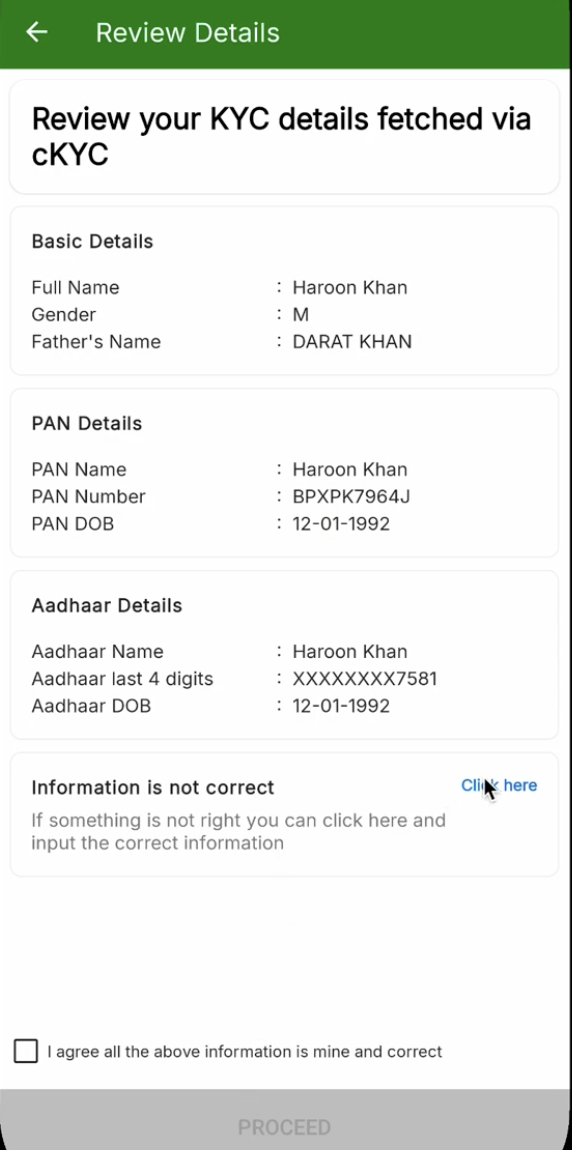
2. The KYC Process: Step-by-Step We prioritize a "Check-and-Confirm" flow to save you time. Follow these steps to complete your verification: Step A: KYC Record Verification The system will first attempt to fetch your records from the Central KYC (CKYC) registry using your PAN and DOB.
Step B: Manual Verification (If Records are Incorrect/Unavailable) If you do not see your records, or if the information displayed is incorrect, you can opt for manual verification:
Regards, PhonePe Merchant Helpdesk | Group: Merchant Profile Type: Re-KYC Attempted Issue: Owner KYC Stage Sub Issue: Info given Status: Resolved | MHD L1 | |
3 | Why do I need to share the POB?
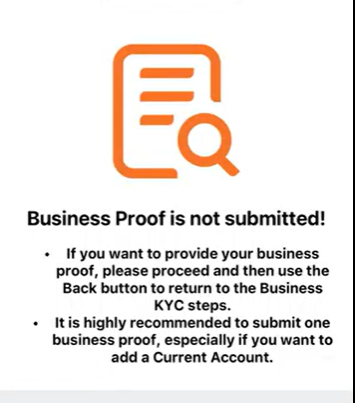
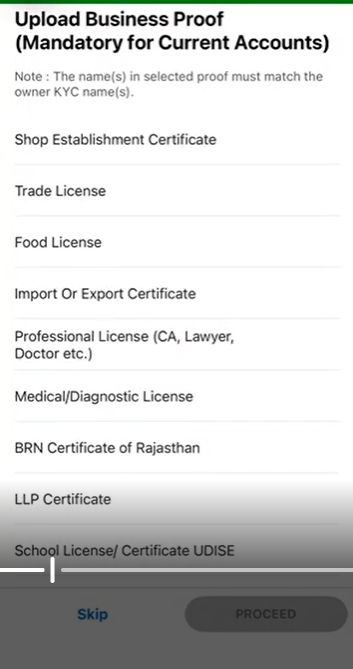
| Agent Action: It is highly recommended that you submit one business proof. This is especially important if you intend to add a Current Account to your profile. Your Options for Submitting Proof of Business (POB): To complete your business verification, you can submit GST in case you do not have GST, you can submit any one of the following valid documents:
Note:
Agent Communication: Hello Merchant, Thank you for reaching us out. To ensure full access to all features, especially if you intend to use a Current Account, we highly recommend completing this step. How to provide your Business Proof:
Important Note: Please ensure the name on your business proof exactly matches the name provided in your Owner KYC. Completing this step will help us verify your business quickly and prevent any potential interruptions to your services. Regards, PhonePe Merchant Helpdesk | Group: Merchant Profile Type: Re-KYC Attempted Issue: BKyc Stage Sub Issue: POB- Info given Status: Resolved | Resolved | |
4 | Need Help with GST.
| Agent Action: Please complete your Re-KYC by providing your Proof of Business (POB). Follow these steps:
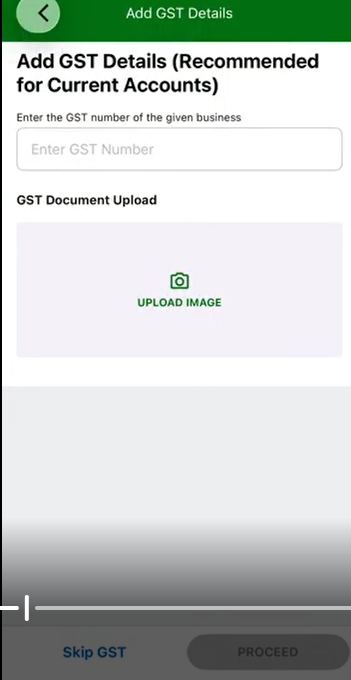
Agent Communication: Hello Merchant, Thank you for reaching us out. To proceed with your onboarding, please provide your GST details by following these steps:
Once uploaded, click proceed to continue with your verification. Note: The name(s) mentioned in your selected proof must exactly match the name(s) provided during your Owner KYC. Regards, PhonePe Merchant Helpdesk | Group: Merchant Profile Type: Re-KYC Attempted Issue: BKyc Stage Sub Issue: GST- Info given Status: Resolved | Resolved | |
5 | Need help to understand the List of documents.
| Agent Action: Please complete your Re-KYC by providing your Proof of Business (POB). Follow these steps:
NOTE: Udyam Aadhaar Generation – If you do not possess any of the listed documents, the system will assist you in generating a Udyam Aadhaar to serve as your valid business proof. Agent Communication: Hello Merchant, Thank you for reaching us out. Do not worry, here is the list of valid documents a merchant can submit as Business Proof- if you do not have GST.
Note: The name(s) mentioned in your selected proof must exactly match the name(s) provided during your Owner KYC. Regards, PhonePe Merchant Helpdesk | Group: Merchant Profile Type: Re-KYC Attempted Issue: BKyc Stage Sub Issue: Document- Info given Status: Resolved |
Re- KYC Error Code FAQ Print
Modified on: Wed, 13 May, 2026 at 4:38 PM
Did you find it helpful? Yes No
Send feedbackSorry we couldn't be helpful. Help us improve this article with your feedback.